|
Showing posts with label Help. Show all posts
Showing posts with label Help. Show all posts
More ways to open composer in a new window
shift + 'c' or shift + click on 'Compose Mail'
shift + 'r' or shift + 'reply' shift + 'a' or shift + 'reply all' shift + 'f' or shift + 'forward' Shift key is needed for keyboard shortcuts to work (caps lock is ignored). If you're replying to a mail and want to change to reply all from your keyboard, hit Esc then 'a'. This is a keyboard shortcut. Saves a mouse click. Because Esc moves the focus out of the text box when you are composing a reply, it allows you to then type the normal keyboard shortcuts 'r' for reply-to-sender, 'a' for reply-to-all, or 'f' forward to change the recipients of your message. So if you're replying to a message, the combination Esc then 'a' will change it to "reply to all" Jquery SLideshow Example
Today we are going to create a photoslider with commenting system,
 Like orkut we can also create a photoviewer with commenting system with animation effects.  So try this and you can also use this example.  Enjoy. Use your notepad to maintain your logs
Windows Notepad: Insert Time and Date into Text or Log File
Notepad is one of window’s best little tools. As I frequently use it with logs, here are a couple of time/date tricks I have learned over the years.
Automatically insert timestamp everytime a file is opened:
2. On the first line of the file type this: .LOG3. Hit ENTER to insert one carriage return. Now… everytime you open the file in notepad, a timestamp will be inserted. This is very usefull trick. Follow this. How do I import csv files into my databaseIn some cases you may need to import the csv files to your database. If you are having excel file just
First you need to login to the mysql command prompt and you need to type the following commands to import To import the datafile, first upload it to your home directory, so that the file is now located at /importfile.csv on our local system. Then you type the following SQL at the mysql prompt:  mysql > mysql > LOAD DATA LOCAL INFILE '/importfile.csv' INTO TABLE test_table FIELDS TERMINATED BY ',' LINES TERMINATED BY '\n' (field1, filed2, field3);The above SQL statement tells the MySQL server to find your INFILE on the LOCAL filesystem, to read each line of the file as a separate row, to treat any comma character as a column delimiter, and to put it into your MySQL test_table as columns field1, field2, and field3 respectively.
If you need to take a csv or other delimited data file and import it INTO MySQL, you can write your own script to do it Play with mysql import, export operations We can easily do import/export operations in mysql very easily. Here is the example for both. In some cases you may have to have backup of your database and you want to use it some other server. In such cases you just follow the instructions given below. You can do the mysql import, export operations in two ways.
Just access the phpmyadmin from your browser(domainname/phpmyadmin)  Once you provided authentication its all done.  Choose a database which you want to export  In the top you can find import,export options.  You can export to many number of formats Once you chosen a format and tables which are to export means it will ask you to save the file. Export is over. You can import sql files easily from here,  It has a disadvantage too. If your database is too big there will be time out problem. In such case you can follow the below one or just contact your hosting company to do this.
Here you need to ssh access in case if you are accessing the remote server or if it is local you just need terminal. First export the existing database by using the below command mysql -u USERNAME -p DATABASENAME > FILE.SQL Once you have the sql file means yoou can import the sql file by mysql -u USERNAME -p DATABASENAME < FILE.SQL Here you need to provide password to access For example # mysql -u root -p forum < forumdb.sqlIt will be stored in your present directory. # mysql -u root -p forum < forumdb.sqlThe sql file should be in the present directory. Leave your comments….
Unzip files under a directory in linux Q. I’m new to Linux command line. I’ve a command called unzip and a file called package.zip. I can extract file using command: unzip package.zip All files are extracted into current directory (it is making a directory called package). I want all files and subdirectory extracted into /opt directory. How do I extract files in /opt? A. unzip command will list, test, or extract files from a ZIP archive, commonly found on MS-DOS systems. The default behavior (with no options) is to extract into the current directory (and subdirectories below it) all files from the specified ZIP archive. By default, all files and subdirectories are recreated in the current directory; the -d option allows extraction in an arbitrary directory (always assuming one has permission to write to the directory). This option need not appear at the end of the command line; it is also accepted before the zipfile specification (with the normal options), immediately after the zipfile specification, or between the file(s) and the -x option. The option and directory may be concatenated without any white space between them, but note that this may cause normal shell behavior to be suppressed. Syntax: unzip {.zip-file-name}-d {/path/to/extract} For example extract package.zip into /opt, enter:
# unzip package.zip -d /optIf you want to rename package directory use mv command: # mv package newnameHow to extract Rar files in linuxWe all know how to extract and view the compressed files which are under zip or rar format. But some us may need at times extracting and viewing these in linux environment.
Q. How do I open rar archive files under Linux / UNIX operating systems? A. RAR files are in compressed archive format, if you have downloaded rar files from the Internet, you need to unpack or unrar them (extract rar files). RAR is a proprietary file format for data compression and archiving, developed by Eugene Roshal. Under Linux and UNIX, use command called unrar. By default unrar is not being installed on Linux, so we need to install it. Install unrar commandUnder Debian Linux, you need to type apt-get as follows to install unrar program: # apt-get install unrarIf you are using Fedora core Linux then use yum command as follows # yum install unrarIf you are using FreeBSD, use: # pkg_add -v -r unrarIf any of above, methods is not working for you, download binary package from official rarlab site: $ cd /tmpUntar file $ tar -zxvf rarlinux-3.6.0.tar.gzBoth unrar and rar commands are located in rar sub-directory. Just go to rar directory: $ cd rarNow copy rar and unrar to /bin directory: # cp rar unrar /binHow to use unrarunrar command supports various options below are common options that you need to use everyday. To open rar (unpack) file in current directory type command:$ unrar e file.rarPlease note that replace file.rar filename with your actual filename. List file inside rar archive:$ unrar l file.rarTo extract files with full path type command:$ unrar x file.rarTo test integrity of archive, file type command: $ unrar t file.rarInstalling gtalk in ubuntu - (Google talk)
You can use gtalk in ubuntu
Just do the following 1. check for gtk2.0 and qt4 $ sudo apt-get install libgtk2.0-dev $ sudo apt-get install libqt4-dev 2. Remove 'pulse audio sound server' Open synaptic package manager and remove pulse audio $ tar -zxvf gtalx.tar.gz5. Get into the directory.... $ cd gtalx and then... $ sudo chmod u+x make $ ./make $ sudo ./make install 6. Enjoy..... Please comment about your installation(whether it was a success or not....) Take gtalx from Applications > Internet > gtalx Enter your gmail login information..and click connect... 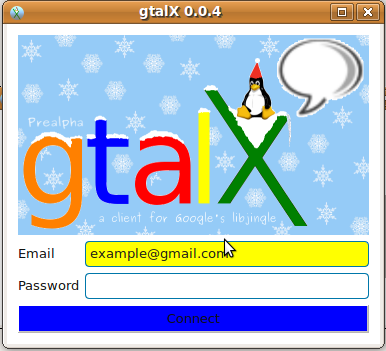 After successful login your online gmail buddies will be listed... Click the "Contact" button to "chat or call" that person..  Upon clicking the contact button you will be shown a screen like this.... If you need to chat..type your message and click "send"... If you want to talk..click 'call".... Enjoy....It worked successfully for me... Any problem please do comment me MVC Directory Structure
The Directory Structure
 I am sure this has great naming convention and we all could understand easily why we are having these folder structure. application - application specific code Once we have our directory structure ready, let us understand a few coding conventions. Coding Conventions 1. mySQL tables will always be lowercase and plural e.g. items, cars and also there are many other standard frameworks, each one having their own advantages, and zend framework provides great security than anything else we just moving with zend and we will be seeing all the frameworks. The other frameworks are Cake PHP Code Igniter Symfony Prado To know more about zend just check out this Zend For more about Php Frameworks please stay with us for some time. Example of MVC ArchitectureExample of MVC architecture: 1. When the user Log In on the login page, a request is sent to the servlet handler.
2. The servlet handler dispatches the request to the appropriate control class. In this case, Login control. 3. The Control performs the action requested by the user on the Model; in this case the Login Model. 4. The Model returns a response; in this example, a successful login message. 5. The Control either redirects to another page or returns to the same page with new data since the Model has been updated. In this case, the Control redirects to the MyPage. 6. The Interpreter gets the HTML for the page requested by the Control from the appropriate View, in this case the MyPage View 7. The View returns the HTML for the page. 8. The Interpreter sends the HTML for the page back to the browser. This is what happening while you are using MVC architecture. Isn't it structured and understandable. Am sure your answer is yes. So in coming posts we will develop a simple MVC application using php with the help of ZEND framework. Model–View–Controller using ZEND framework
Model–View–Controller
Model–View–Controller (MVC) is an architectural pattern used in software engineering. Successful use of the pattern isolates business logic from user interface considerations, resulting in an application where it is easier to modify either the visual appearance of the application or the underlying business rules without affecting the other. In MVC, the model represents the information (the data) of the application; the view corresponds to elements of the user interface such as text, checkbox items, and so forth; and the controller manages the communication of data and the business rules used to manipulate the data to and from the model. The main aim of the MVC architecture is to separate the business logic and application data from the presentation data to the user. Here are the reasons why we should use the MVC design pattern. 1. They are resuable : When the problems recurs, there is no need to invent a new solution, we just have to follow the pattern and adapt it as necessary. 2. They are expressive: By using the MVC design pattern our application becomes more expressive. 1). Model: The model object knows about all the data that need to be displayed. It is model who is aware about all the operations that can be applied to transform that object. It only represents the data of an application. The model represents enterprise data and the business rules that govern access to and updates of this data. Model is not aware about the presentation data and how that data will be displayed to the browser. In simpler terms Model handles all our database logic. Using the model we connect to our database and provide an abstraction layer. 2). View : The view represents the presentation of the application. The view object refers to the model. It uses the query methods of the model to obtain the contents and renders it. The view is not dependent on the application logic. It remains same if there is any modification in the business logic. In other words, we can say that it is the responsibility of the of the view's to maintain the consistency in its presentation when the model changes. In simpler terms Controller represents all our business logic i.e. all our ifs and else. 3). Controller: Whenever the user sends a request for something then it always go through the controller. The controller is responsible for intercepting the requests from view and passes it to the model for the appropriate action. After the action has been taken on the data, the controller is responsible for directing the appropriate view to the user. In GUIs, the views and the controllers often work very closely together. In simpler terms View represents our presentation logic i.e our HTML/XML/JSON code. What is MVC ArchitechtureIf You are planned to develop a project(Stand alone application/Web development) you have to look into many aspects regarding security,code readability and re-usability,understanding and many aspects as per your project goes. What ever your project domain or what ever your technology chosen for project you will be having directory and file structure. Or else the total system will be confusing and some times the whole project concept will be clopsed. So you should be careful on directory and file structure once you finished your project requirement analysis, and another reason for security reason also you should follow a structured way of programming. Whether you can define your own file structure or you can have already built in architectures. If you are planned to write your own file structure means have these things in your mind. 1. Storage 2. Programming 3. GUI Even stand alone or web application you should have these analysis. Or if you are planned to use built in architectures means i always recommend you just know about MVC and you will be happily programming. Especially when it comes web application it supports you more than you expect. Because it is not technology dependent. You can use it in PHP/ASP/JSP What is MVC Architecture? The main aim of the MVC architecture is to separate the business logic and Advantages of MVC 1.Modifying isvery easier
Subscribe to:
Posts (Atom)
Follow Us on Twitter

|


